Let Your Website Do the Selling in B2B
As a marketer, I have the opportunity to look at a wide variety of company websites when assessing our inbound leads. I am always surprised by the number of websites I come across that are not user friendly. Within the B2B industry, your website can mean everything to your potential customers. Prospects want information and they want to get it fast without much effort.
The article Give Them the B2B Content They Want tells you how to give your online visitors just that.
According to the article, when buyers are searching for information on your site they ask 3 questions:
- Am I in the right place?
- Is there something here for me?
- Can I get to it easily?
In order to help your viewers answer these three questions with a simple yes, make sure to utilize a few simple suggestions, outlined below.
Thanks in large part to the great websites that exist, a standard for layout has been set. As a web surfer, you are used to this standard and look for items in certain locations. For example, when I go to research a lead’s company, I expect to find a brief overview of what the company is selling on the homepage. I also expect to find an About Us tab either at the top of the page or along the sidebar at the left or right hand side. Surprisingly enough, some sites I have come across make it relatively difficult to even figure out what it is they do. Not only is it important to follow the standard for organization and flow of your website, but it is also important to communicate your message clearly. By having more organizational flow to your website, you also increase SEO.
Another nuisance is not understanding the content of a website. When too much marketing fluff or too many industry words are used, it is hard for others to get the gist of the product or service. Keep the wording short and to the point. Bullet points stand out and help visitors learn more quickly. Also it is helpful to distinguish yourself from your competition. In the B2B industry, buyers will check out multiple options, so make sure to inform your audience why your product is the best.
Following the idea of clarity when promoting your product, the use of visuals also helps describe your company and product. Use key visuals to not only portray your brand, but also to quickly connect words to images. Images and videos are longer lasting memories. They also jump out and attract attention unlike paragraphs.
To wrap it up, let’s list the main points to remember when designing your number one tool to sell your product.
- Organization is key. Make it easy for visitors to locate the information they want.
- Clarity gets the point across. Define your product or service in a simple, straightforward way.
- Use visuals. Attract the eye and provide lasting memories.
SpamAssassin Rules and what they Mean for your Emails
For the past several years I have been following SpamAssassin’s rule set and I am always amazed by how many seemingly innocuous things (e.g. “Dear x”) can make perfectly harmless emails come under suspicion.
The vast majority of issues come from poorly coded/authenticated emails. This can either be the fault of the email’s designer (in the case of poor HTML) or the the platform (infrastructural issue). Some common HTML issues include:
- Too much code (in terms of your code to text ratio)
- Too little text (in terms of your text to image ratio) — you get penalized for being succint if you also use images
- Poorly written code (title set to “untitled”; unclosed tags, etc.) — apparently spammers cannot code well
- Larger or smaller than ordinary fonts — stick to something similar to 10-12pt
- “Shouting” — too many words in all caps; excessive use of red or blue font
- Hiding the unsubscribe text by making the font the same color as the background — a shady practice that would only result in spam complaints anyway

Here are a few highlights that I often see being violated that you would never think about from a SPAM perspective. It is interesting that what is often thought of as a best practice (explaining how/why someone was subscribed and how he or she could unsubscribe) must be worded carefully to avoid a penalty:
- Email contains ‘Dear (something)’ — so much for being friendly
- Claims you can be removed from the list
- Talks about how to be removed from mailings
- Removal phrase right before a link
It is humorous though quite sad that email has been somewhat ruined because of all of the bad apples who take advantage of unsuspecting inboxes. Twitter, unfortunately is likely to follow if unchecked.
Measuring email marketing deliverability
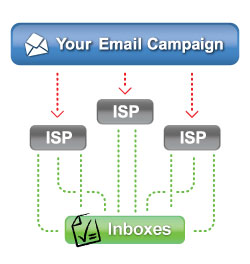
Email marketing vendors often boast that their infrastructure and ISP relations teams lead to high deliverability. While it is true that any ESP is likely to significantly beat a company’s in-house solution, it becomes more difficult when trying to compare one ESP’s deliverability to another.

When you are evaluating email vendors, I highly recommend starting by subscribing to their respective newsletters via multiple email addresses (Gmail, Yahoo!, corporate account, etc.). Then tote whether or not the messages are delivered to your inbox in major email clients. This would seem to be an obvious test but many buyers simply rely on reputation rather than experimentation when making a decision.
Measuring the Sender Score of the Vendors
Return Path, who operates the largest email accreditation service, Sender Score Certified, rates IP addresses by giving them sender scores. The score is made up of several different factors such as SPAM complaints, sending volume, amount of mail sent to unknown addresses. and the IP’s DNS settings. Anything lower than 70 should be avoided. Ideally you want to see something that is 80 or higher.
To find the IP address of the mail server for an email you receive, you will need to see the message’s original headers.
In Gmail for example, click on the downward arrow on the top right of an email. Then select “Show Original” to see the message’s headers. You can then see the IP address of the sender and check it here. You will be surprised by how many low scores you will find. You can do this in a similar manner with Yahoo! Mail and other major email clients.
Checking Email Authentication
The header also gives you other useful information such as whether or not the emails pass various types of authentication. ISPs and corporate filters use some or all of the four major authentication frameworks to help classify email. Most email clients will allow you to check your incoming emails to see if they are authenticated. Gmail for example will tell you whether or not the email passes SPF and DKIM authentication. Simply do a find for “DKIM” when viewing the header. The more levels of authentication your ESP uses, the better the deliverability is likely to be.
There is of course a lot more than deliverability that goes into an email service provider evaluation (feature set, ease of use, services component, etc.) but this should at least give buyers an objective to way measure one of the more esoteric aspects of email marketing.
Is your vendor bleeding your page rank?
Just a word of warning to marketers: I have seen a distubring resurgence of SEO black hat chicanery by agencies and software vendors that I thought died out a few days ago. In the past week I have seen websites where either a design firm or a web analytics company put a hidden link back to its home page on each and ever single one of its clients’ pages.
There are a couple of reasons why companies should be wary of this:
- Links out to third party sites send page rink (i.e. “link juice”) to other sites. This is fine when you intend to link somewhere, but less so when every one of your pages has a hidden outbound link.
- Google warns not to do anything with your site that is explicitly meant for bots or to try to game page rank. Hidden links in noscript tags certainly fall into this category.
- If you vendor is doing this, what else are they doing that you should know about. I’d head for the door at the first sign of this sort of practice.
Not all web analytics code is created equal. Be sure to take a look at it and understand what it means. If there is a link to your agency or vendor’s homepage buried into it somewhere (especially with alt text in it) there is like no reason for it other than to game the search engines.
Granted in the recent cases I saw, this was done by smaller vendors, perhaps looking to get a leg up on their competitors in the SEO game, but I have to believe that black hat tricks like this will ultimately penalize them.
Marketing in the Cloud is Doing Just Fine
Quite a big deal was made recently about salesforce.com’s 38 minute outage last week. I have to say I agree with Paul Greenberg, when he said calling ”the cloud into question because their servers were down for 38 minutes is a little bit of an emotional overload.”
People are quick to blame the cloud when there is more than a few minutes of downtime, calling its reliability into question. What most people do not consider is that internally hosting an application does not give any better guarantee of uptime. For many businesses it probably increases the liklihood of an outage. At most companies that I have worked for the Internet, VOIP phones, apps hosted on internal servers, and other services had outages at least a few times a year. Human error, catastrophic failures, and acts of nature can strike even the most ironclad systems. In the grand scheme of things, 38 minutes for salesforce.com to get everything back up is pretty impressive. It is also great they put up an explanation on trust.salesforce.com, which is not something that most vendors would do.
On a personal level, I just recently moved this blog from the installed version of WordPress to the hosted version. Why on earth would I want to spend time installing security patches, managing the hosting for it, or any of the other headaches of installed software. WordPress.com of course has expertise in managing its own software. I also use a SaaS CRM, marketing automation platform, project management tool, and community management system.
Top 5 Ways to Keep Your B2B Web Lead Data Clean
Ardath Albee wrote that you can lift revenues 70% by cleaning up dirty prospect data. I don’t think we need much more of an incentive than that to start keeping our data clean.
CRM systems do many things extremely well. Deduplication of lead/prospect data, however, does not often seem to be one of them. The following are my four favorite things you can do to keep your CRM clean (at least in terms of the leads that come in from your site):
1. Automatic deduplication at the web form level — the same person filling out the form multiple times only creates one lead/prospect (but you still capture the activity).
2. Data validation at the form level — at the minimum, ensure that email addresses are in a valid format (blank@site.com, etc.). Even better is setting up your form to ping the domain in real-time and ensure that it has an actual mail exchange record. The latter method prevents people from entering things like abcdef@abcdef.com (which would pass the first test). At my company we take this one step further and actually do not accept free/ISP email addresses. We do not want our sales reps following up with Yahoo! or Gmail addresses.
If the visitor’s email address fails validation, be sure to provide a soft error (see below) message as soon as they tab off of the field as opposed to having them click the submit button, only to be surprised by a glaring error notification.

(soft error example)
3. Limiting choices via drop downs instead of free-form text — this makes fields like industry, job title, etc. much more usable later as you will not get permutations of the same title (e.g. VP, Vice President, etc.). This also makes things easier for the visitor as he or she can typically fill the form out faster than with free text fields.

Predefined Field Values = Better Data
4. Keep bots away with built in spam prevention. If left unchecked, bots can quickly fill a company’s database with gibberish. Many companies (including Google) do this via captchas (an additional field where you enter a string of text or a number to prove that you are indeed a human). I prefer to instead use a hidden spam trap that humans never need to see or deal with. Captchas, while effective in term of spam prevention, can frustrate visitors and drive down your conversion rate.
So how do you do all of this?
Each of the techniques above can be accomplished with either some custom programming or via a marketing automation solution. Either way, the technology is out there and it will make your life easier and your data cleaner.
B2B Marketing Lessons from the King
Are you a Big Mac or a Whopper?
McDonald’s has long been lauded for its scientific approach to determining optimal real estate for new store locations. For a time Burger King engaged in an arms race of sorts, competing with the better-financed Golden Arches for the best new opening possibilities. Burger King later shifted strategy and started to simply wait for McDonald’s to open new stores first. The King would then quickly follow suit, constructing a new store within a few blocks. This tactic negated many of the real estate analysis advantages that McDonald’s once enjoyed and shifted the battle to product and customer experience.
Take a look around the next time you go to a BK. You’ll probably see a McDonald’s just down the street.

So how does this apply to you as a B2B marketer?
If you are not the top dog in your market, mimicking BK’s strategy may be a good approach when determining where to spend your marketing dollars. A good technique is to take your savviest (though not necessarily your biggest) competitor, and watch very carefully how and where they are spending their marketing dollars. Let them make their marketing investments, ad places, and trade show bookings. They will no doubt be spending some of their dollars evaluating which media are effective. See what sticks and copy their approach. Are they focusing on certain keywords for SEO/SEM, sponsoring certain sites or newsletters, or attending key trade show? That is like market research that you are getting for free.
Be sure to set up Google Alerts for your competitor’s company and product names (I’ll write more on using Google Alerts in a future post) to get a head’s up when they post on sites, issue press releases, add to their blog, etc.
It is not a hard and fast rule, but chances are if the savviest (until you take that title away) marketer in your space is consistently putting dollars into something, it is worth being there as well.

B2B Marketing Strategy from "The King"
For Marketers with Short Attention Spans
I need to make some SEO improvements… finalize ad placements for late 2009… write a blog entry… look, a bright shiny object. Where was I?
I feel like a lot of marketers are like me: they wear a lot of hats and have a lot on their plates. As such, I am eternally looking for ways to stay organized and have tried quite a few recently. Here’s a quick rundown of four tools I considered and the ultimate winner:
Our corporate CRM (salesforce.com):
I really just need a glorified to-do list, perhaps with simple milestones and reminders. The CRM can easily handle this but it adds quite a bit of complexity to that process as well — definitely overkill for what I needed.
Simple Project Management Tool (Basecamp by 37Signals):
This is getting a lot closer but it still feels like a bit of overkill for what I need and doesn’t show up quite right on a mobile device. I do absolutely love Basecamp for group projects though and am an avid user. The folks at 37Signals improve the platform pretty rapidly and make great choices to keep it from being bloated with features that 80% of us do not really need. The have put together an excellent book that explains their product management philosophy and it is a great read for anyone building anything (but particularly a SaaS product).
To Do List Manager (todoist.com):
I had previously taken a look at the above-mentioned 37Signals’ Tadalist, which was great because of its simplicity and also its pricetag (can’t beat free!). It also looks great on an iPhone. Then I found Todoist, which seems to strike the right balance between simple (and free) and robust. It allows for very easy organization of to-do items, prioritization, sub-items. They have widgets and plug-ins for OS X, iGoogle, Firefox, and Gmail and a pro version allows for proactive notifications of deadlines via basically every medium you could imagine. Todoist also boasts an API allowing you to make your own apps that pull and push data. If they come out with an iphone app (they have a mobile site but it is a bit lacking currently), they will be perfect for me. Again, it’s free and definitely worth a look if you are looking for something to replace the post-it notes on your monitor.